
Is your Navien tankless water heater acting up and leaving you without hot water? Don’t worry—you’re not alone, and fixing it might be simpler than you think.
Knowing how to reset your Navien water heater can save you time, money, and the hassle of calling a technician. You’ll discover clear, step-by-step instructions to get your heater back on track quickly. Keep reading, and you’ll have your hot water flowing again before you know it.
Credit: www.youtube.com
Signs You Need A Reset
Knowing when to reset your Navien tankless water heater can save time and avoid bigger problems. Certain signs tell you a reset might help fix the issues. Recognizing these signs early can keep your water heater running smoothly.
Common Error Codes
Navien water heaters display error codes to show problems. Codes like 13, 14, or 16 often mean a reset is needed. These codes indicate issues with ignition or water flow. A reset can clear the error and restart normal operation.
Performance Issues
When hot water takes too long to arrive, or the temperature fluctuates, a reset might help. Poor heating can result from temporary glitches. Resetting the unit often restores proper water temperature quickly.
Unusual Noises
Strange sounds from the heater signal trouble. Clicking, banging, or humming noises are not normal. These noises can come from buildup or faulty parts. A reset can sometimes stop the noise and improve function.
Safety Precautions
Resetting a Navien tankless water heater needs careful attention to safety. Taking the right steps prevents accidents and damage. This section explains key safety tips to follow before and during the reset process.
Power Off Procedures
Always turn off the power before starting the reset. Locate the breaker switch and flip it off. This stops electric shocks and protects the heater’s electronics. Wait a few minutes to let the system fully shut down. Never touch electrical parts while the power is on.
Gas Supply Considerations
Check the gas supply before resetting the heater. Turn off the gas valve to avoid leaks or fire risks. Make sure the area is well ventilated. If you smell gas, do not proceed. Contact a professional for help immediately.
Handling Hot Water
Be careful of hot water inside the heater. Let the water cool before working on the unit. Open a hot water tap to release pressure slowly. Hot water can cause burns if not handled properly. Use gloves if you need to touch pipes or valves.
Resetting The Water Heater
Resetting the Navien tankless water heater can solve many common issues. This process helps clear error codes and restore normal function. It is a simple task that anyone can perform with basic guidance.
Knowing how to reset your water heater can save time and avoid costly repairs. Follow the steps below carefully to reset your unit safely and effectively.
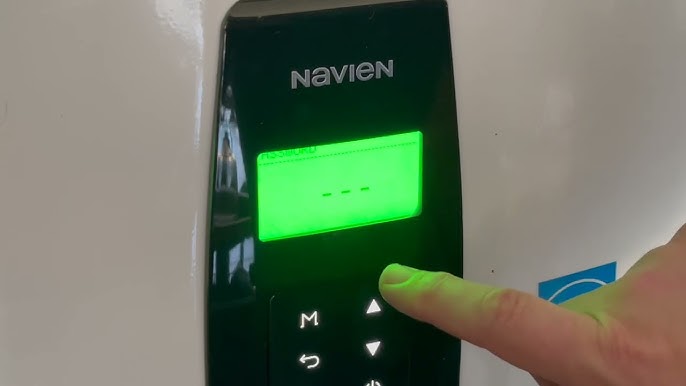
Locating The Reset Button
The reset button is usually on the front panel of the water heater. It is small and round, often red or black in color. Look near the control board or behind a small access panel. Check your user manual if you have trouble finding it.
Step-by-step Reset Process
First, turn off the power supply to the water heater. This step ensures safety during the reset. Next, press and hold the reset button for about 5 seconds. Release the button once the unit begins to reboot. Turn the power back on and wait for the system to restart completely.
What To Expect After Reset
The water heater may take a few minutes to heat water again. You might hear some noises as it restarts. Check the display for any error codes. If the problem persists, another reset might be needed or professional help should be contacted.

Credit: www.reddit.com
Troubleshooting After Reset
Resetting your Navien tankless water heater often clears minor problems. Sometimes, issues persist after the reset. Troubleshooting helps find the cause and fix the problem fast. This guide covers common problems to watch for after a reset.
Persistent Error Codes
Error codes may still appear after resetting. Note the code shown on the display. Check the user manual for the code meaning. Some codes need specific fixes like cleaning or part replacement. Keep track of recurring errors to inform a technician if needed.
Water Temperature Issues
Water may stay too cold or get too hot post-reset. Check the temperature settings on the control panel. Make sure the heater gets proper power and gas supply. Flush the system if mineral buildup blocks heat transfer. Adjust settings slowly to find the right temperature.
When To Call A Technician
Call a professional if error codes remain unresolved. Also seek help for water leaks or strange noises. If the heater fails to start or shuts off often, get expert support. Avoid trying complex repairs without experience to prevent damage or injury.
Maintenance Tips To Avoid Resets
Keeping a Navien tankless water heater running smoothly means fewer resets. Good maintenance helps avoid common problems. It saves time and money on repairs. Small efforts can keep your heater working well for years.
Regular Cleaning
Cleaning the heater regularly stops dirt buildup. Remove dust and debris from vents and filters. This keeps air flowing and parts cool. Clean the heat exchanger to prevent blockages. A clean heater works more efficiently and lasts longer.
Checking For Leaks
Leaks can cause damage and system errors. Look for water around pipes and connections. Tighten loose fittings or replace worn parts. Catch leaks early to avoid big problems. Dry areas help keep the heater safe and reliable.
Professional Servicing Schedule
Hire a professional for yearly inspections. Experts check parts that are hard to reach. They clean internal components and test safety features. Regular service spots issues before they grow. A well-serviced heater runs better and needs fewer resets.

Credit: www.navieninc.ca
Frequently Asked Questions
How Do I Reset A Navien Tankless Water Heater?
Press and hold the reset button on the control panel for 5 seconds. The unit will restart.
What Causes A Navien Water Heater To Need Resetting?
Error codes, overheating, or power interruptions often require a reset to clear the system.
Can I Reset The Navien Heater Without A Manual?
Yes, the reset button is usually on the front panel. Press and hold it to reset.
How Often Should I Reset My Navien Tankless Water Heater?
Only reset when you see an error or the unit stops working properly.
Will Resetting Fix All Navien Water Heater Problems?
Resetting clears errors but won’t fix mechanical or plumbing issues. Call a technician if problems persist.
Is It Safe To Reset The Navien Water Heater Myself?
Yes, resetting is safe and simple. Just follow the steps on the control panel carefully.
Conclusion
Resetting your Navien tankless water heater is simple and quick. Follow the steps carefully to avoid mistakes. This process helps fix common issues and keeps your heater working well. Regular resets can improve performance and extend its life. Always check the manual for safety tips.
Stay calm and take your time. Your water heater will be ready to use again soon. Keep this guide handy for future reference.