
Is your Pentair pool heater display not working and leaving you in the dark about your pool’s temperature? You rely on that screen to keep your water warm and comfortable, so when it goes blank or shows errors, it’s frustrating—and confusing.
Don’t worry, you’re not alone, and fixing this issue might be easier than you think. You’ll discover simple steps to diagnose and solve the problem quickly. Keep reading to bring your pool heater display back to life and enjoy your perfect swim again.
Common Causes Of Display Failure
The Pentair pool heater display may stop working due to several common issues. These problems often prevent the screen from showing important information. Understanding the typical causes can help identify and fix the issue faster.
Many times, the root of the problem lies in power supply issues. Without steady power, the display cannot function properly. Other times, faulty wiring connections interrupt the signal to the display.
Physical damage to the display screen also causes failure. Knowing these causes helps in troubleshooting and restoring the heater’s display.
Power Supply Issues
The display needs consistent power to work. A tripped breaker or blown fuse can cut power to the heater. Loose or damaged power cords may also cause problems. Check that the heater is plugged in and power is reaching the unit.
Faulty Wiring Connections
Wiring inside the heater can come loose or corrode. This stops signals from reaching the display. Vibrations and heat can wear out wires over time. Inspect wiring harnesses and connectors for breaks or corrosion.
Display Screen Damage
The screen itself may crack or fail due to moisture or impact. Exposure to water can short circuit the display. Scratches or cracks make reading the screen hard or impossible. Replacing the display may be necessary if damaged.
Credit: intheswim.com
Basic Troubleshooting Steps
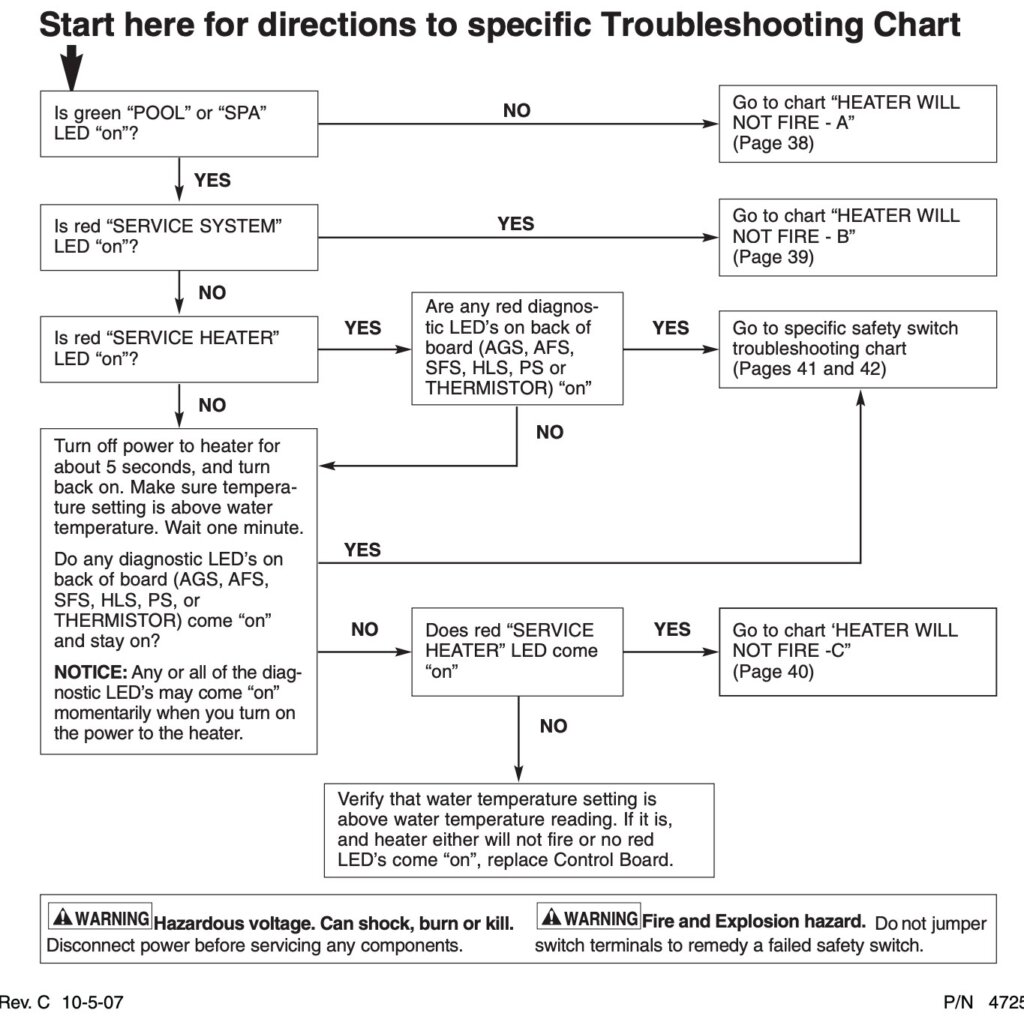
Basic troubleshooting helps find simple problems with your Pentair pool heater display. It saves time and avoids costly repairs. Start with easy checks. These steps work for most display issues. Follow each carefully for best results.
Resetting The Heater
Turn off the pool heater power. Wait at least 5 minutes to let it fully reset. Turn the power back on. Watch the display for changes. Resetting clears minor errors and may fix the screen. Repeat if needed.
Checking Circuit Breakers
Locate the circuit breaker panel. Look for tripped breakers marked for the pool heater. Switch any tripped breakers off and then on again. This restores power to the heater. A tripped breaker often stops the display from working.
Inspecting The Fuse
Find the fuse on the heater’s control board. Use a fuse tester or multimeter to check it. Replace the fuse if it is blown or damaged. A bad fuse stops electricity from reaching the display. Keep spare fuses handy for quick fixes.
Diy Fixes For Display Problems
DIY fixes for Pentair pool heater display issues can save time and money. Many problems come from simple causes. You do not always need a professional to solve them. Small checks and repairs often restore the display’s function quickly.
Cleaning The Display Contacts
Turn off power to the heater before starting. Remove the display panel carefully. Use a soft cloth or cotton swab with rubbing alcohol. Gently clean the contacts and connectors. Dirt or corrosion can block signals. Let the contacts dry completely before reassembling. This simple step often fixes unresponsive displays.
Replacing Loose Wires
Loose wires can cause the display to fail. Check the wiring behind the panel. Look for any disconnected or shaky wires. Tighten loose connections with a small screwdriver. Replace damaged wires with similar gauge wire. Secure all wires to prevent future movement. This repair ensures steady power and signal flow.
Updating Firmware
Outdated firmware may cause display errors. Visit the Pentair website for the latest update. Download the update file to a USB drive. Connect the USB to the heater’s control board port. Follow the instructions on the screen for updating. Keep the heater powered during the process. Firmware updates can fix bugs and improve display function.

Credit: www.youtube.com
When To Call A Professional
Knowing when to call a professional for your Pentair pool heater display is important. Some problems can be fixed at home. Others need expert help to avoid damage or injury.
Trusting a skilled technician saves time and keeps your heater safe. Professionals have the right tools and knowledge. They can spot hidden issues and fix them correctly.
Complex Electrical Issues
Electrical problems can be tricky and dangerous. Faulty wiring or circuit board issues require expert attention. Incorrect handling can cause shocks or worsen the problem.
A professional can test and repair electrical parts safely. They ensure your heater meets all electrical standards.
Internal Component Replacement
Some parts inside the heater need special tools to replace. Sensors, control boards, or relays may fail over time. Fixing these needs skill and care.
A technician knows how to remove and install parts properly. This keeps your heater working well and prevents new issues.
Ensuring Safety Compliance
Pool heaters must follow safety rules to protect users. Professionals understand these codes and apply them during repairs. They check that all fixes meet safety guidelines.
This reduces risks of fire, leaks, or electrical hazards. Calling a pro ensures your heater stays safe for everyone.
Preventive Tips For Display Longevity
Keeping your Pentair pool heater display working well saves time and money. The display shows important information about your pool heater’s status. Simple care steps help avoid common problems. These tips extend the life of your display and keep it clear and easy to read.
Regular Maintenance Schedule
Check the display often for dirt and dust. Clean gently with a soft, dry cloth. Avoid strong chemicals that might damage the screen. Schedule regular inspections to catch small issues early. Replace worn parts before they cause bigger problems.
Protecting From Moisture
Keep the display dry to prevent damage. Avoid splashes from the pool or rain. Use waterproof covers if the heater is outside. Ensure the area around the display has good airflow. Moisture can cause the screen to stop working.
Avoiding Power Surges
Power surges can harm the display’s electronics. Use a surge protector to guard the heater. Turn off the heater during storms or power outages. Stable power keeps the display safe and reliable. This step lowers the chance of sudden display failure.

Credit: github.com
Frequently Asked Questions
Why Is My Pentair Pool Heater Display Not Turning On?
Check power supply and circuit breaker. Loose wires or blown fuses can stop the display from lighting.
How Do I Reset The Pentair Pool Heater Display?
Turn off power for 5 minutes, then turn it back on to reset the display screen.
Can A Faulty Thermostat Cause The Display To Fail?
Yes, a bad thermostat can stop the display from showing temperature or error codes.
What Should I Do If The Display Shows Error Codes?
Look up the code in your manual. It guides you on the issue and fixes.
Is Screen Damage A Common Reason For No Display?
Physical damage or water exposure can break the screen and stop it from working.
When To Call A Professional For Display Problems?
Call a technician if basic checks fail or if you see complex error codes.
Conclusion
A Pentair pool heater display not working can cause frustration. Simple checks often solve the issue fast. Ensure power supply and connections are secure. Resetting the heater might help too. If problems persist, contacting a professional is wise. Regular maintenance keeps the heater running well.
Taking care early saves time and money later. Enjoy your pool with a working heater display. Troubleshooting is easier with clear, step-by-step actions. Keep your pool warm and comfortable all season long.